
Blog
Take Note – Microsoft OneNote abuse and how to tackle it
Threat actors increasingly use OneNote attachments in phishing emails that infect victims with remote access malware which can then be used to install even more malware or steal such things as passwords and cryptocurrency. WithSecure™ has recently seen a spike in this kind of activity in customer estates.
Jojo O'Gorman and Riccardo Ancarani from WithSecure Labs have just published research outlining the simulation (and controlled detonation) of various abuse cases associated with the OneNote file formats and giving practical advice for preventing and detecting the attack.
Based on the controlled experiments, it was concluded (at the time of writing) that several security solutions were not correctly parsing OneNote files. That, combined with the fact that .one files are not part of Microsoft's Outlook attachment blacklist, makes .one files very appealing to attackers.
The adoption of using OneNote attachments for malicious purposes comes after Microsoft recently initiated a series of measures to thwart attackers in their attempts to distribute malware via malicious Word and Excel attachments – something they have been doing for several years.
Microsoft OneNote is part of the Microsoft Office suite and is commonly used within most organizations for note-keeping and task management. As it is installed by default in all Microsoft Office/365 installations, it can still be used to open file formats, even if the application itself is not used.
OneNote as an attack vector has been getting more attention largely due to a research paper published in mid-2022 which outlined various potentially interesting characteristics for attackers. In particular, was the ease of attaching files in existing OneNote notebooks that victims can execute with little warning.
Among the use cases WithSecure researchers focused on where OneNote could be exploited were instances where attackers can embed executables in OneNote sections and then lure users into executing them with various pretexts.
Even official-looking warning signs can catch you out
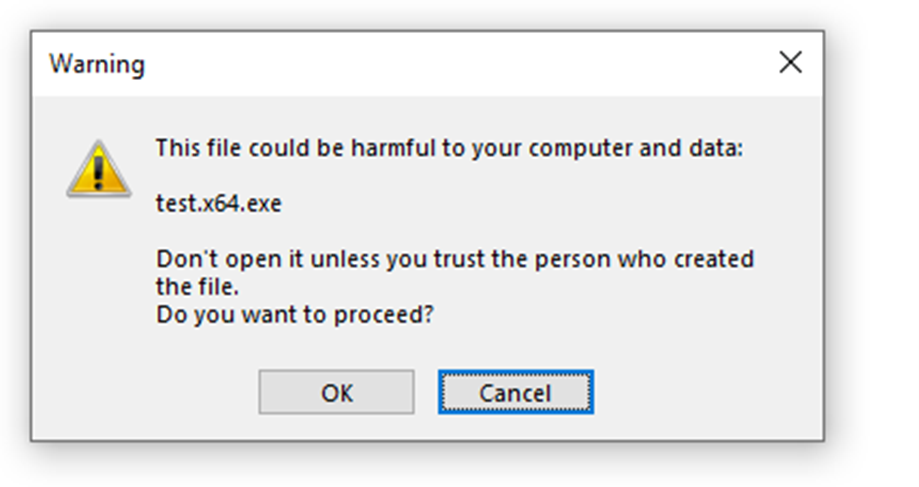
For example, when double-clicking an attachment, OneNote can display a warning message that the attachment may not be safe. The file won't be written to disk or executed until the user clicks "ok" on the "do you want to proceed" message.
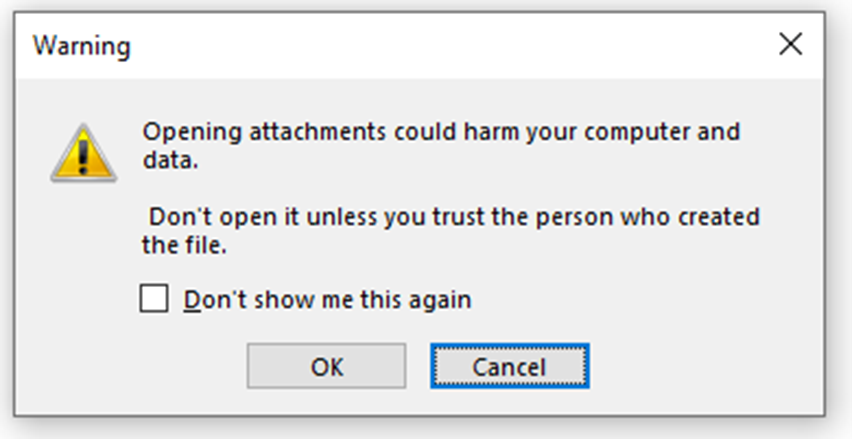
However, users can be caught out by ticking the "don't show me this again" box before clicking ok, whereby their choice will be remembered. Subsequently, they are shown a slightly different message asking them to confirm if they want to proceed with the execution. Simply put, if one of these messages pops up, the executable can be prevented from being written to disk by clicking 'cancel.
Another example that was looked at was a technique referred to as RTLO (right-to-left override) spoofing. This phishing method tricks users into opening what they think is a totally harmless text file, but what is, in fact, a malicious executable file.

Attackers can make their malicious file look like a harmless image by adding a fake .png extension, thereby hiding the real file type which is in this case an .hta.
Security advice for organizations
WithSecure Elements' EPP and EDR components use a variety of detections to identify malicious activity associated with OneNote attachments. Additionally, the research highlighted various remedial actions that could be taken to reduce the chance of attack, such as:
- Deploying application control, thereby blocking unsigned EXEs from being executed
This prevents unsigned executables embedded in OneNote files from being executed once a user double-clicks them. - Enabling Attack Surface Reduction with the rule "Blocking Office applications from creating child processes"
This prevents programs like OneNote from launching new processes, i.e. if the user clicks an embedded executable, it will fail to launch it. - Blocking, if possible, the direct download of one and onepkg files at the proxy level, as well as .one and .onepkg email attachments
This will prevent malicious OneNote files from being downloaded and block users from opening them as attachments when sent in an email. - Monitoring file write operations and the operations of OneNote.exe processes (especially when a .one file is downloaded from the internet).
This allows for the detection of anomalous actions performed by OneNote.exe (i.e. the result of users interacting with malicious OneNote files can be detected, the user can be alerted, and remediation can be carried out). - Paying close attention to any process creation events associated with common LOLBins (Living Off the Land Binaries)
Usage of these LOLBins indicates the intent to execute code which is anomalous for OneNote files, so this is a good indicator of suspicious activity.
So, it seems that OneNote joins its software counterparts in being targeted for attack. WithSecure concludes that cybercriminals will continue to make more and more complex attempts at compromising customer estates. Hence, the most effective way to protect against these attacks is to educate employees on not clicking on email links from unknown parties or downloading attachments. Additionally, they should be educated not to ignore warning message prompts for Microsoft programs.